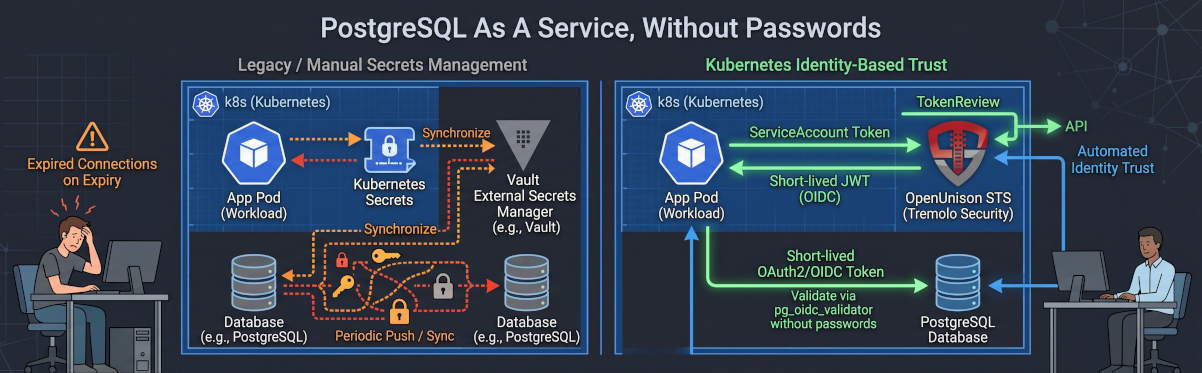
Wouldn't it be great to provide PostgreSQL as a Service for your applications? The major cloud vendors all do it. Wouldn't it be great if you could do the same, with all the automation and security they provide? There's a great project in the CNCF called CloudNativePG which lets you do just that. Deploy a database with an API call. Manage storage, backups, etc.. Everything for a service! So if we were to build this service, the first thing we'd do is build a Kubernetes cluster, add storage, create a backup and retention process, etc. We'd also build out a LoadBalancer or another way for applications to reach their databases. A git commit triggers the creation of a database, and our application launches! Of course, there's now just the question of getting credentials to your application.
You could use Vault. Database credentials stored in Kubernetes Secrets can be synchronized to Vault, or another secrets manager, and distributed from there. And of course, you could use OpenUnison to make sure access to that Vault is done via short lived tokens! The issue with that approach is you're still using a password that needs to get updated regularly. That means coordinating rotation, distributing updated credentials, and making sure applications pick them up without breaking connections. Lots of headaches that would go away if your database could just trust your workloads based on their identity.
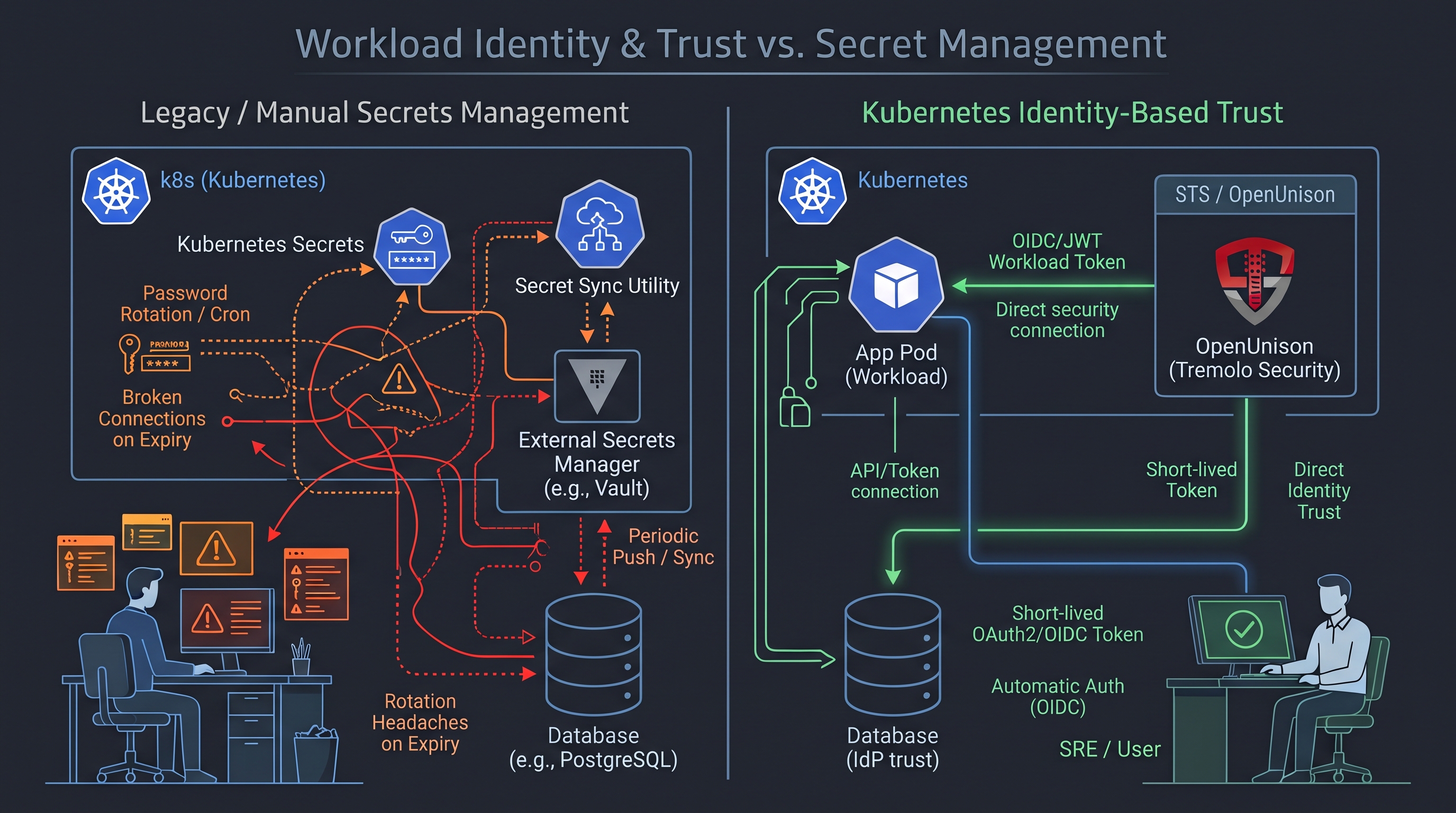
With PostgreSQL 18, we have a way to do that. PostgreSQL 18 added support for OAuth 2.0 authentication. Before we get too far, though, OAuth 2.0 doesn't mean JWT. A bearer token could be a JWT, or it could be an opaque token that needs to be validated by the service that issued it. A cloud identity service could issue the token, but PostgreSQL still needs to know how to validate it. That's why PostgreSQL provides a framework for OAuth validator modules. The database handles the authentication protocol, and a plugin handles the details of trusting your token.
Fortunately, Percona has built an open source implementation called pg_oidc_validator. It supports providers that issue JWT access tokens and expose the OIDC information needed to validate them. Once the token is validated, its identity can be mapped to a PostgreSQL user using PostgreSQL's identity mapping configuration. We still create database roles and grant permissions, but our application no longer needs a password for that role.
Of course, the client needs to speak the same protocol. Supporting OAuth on the server doesn't automatically add it to every database driver! Client libraries are catching up, and our demo uses the PostgreSQL JDBC driver changes from this pull request. That work hasn't been merged yet, so the demo depends on a build with those changes. Once this PR get's accepted, we'll update this post with any changes.
Now we can authenticate with a JWT. Where does our application get one that the database should trust?
If our application is running on Kubernetes, it already has an identity: its ServiceAccount. With a projected ServiceAccount token, we even have a JWT! It might seem like all we need to do is configure PostgreSQL to trust the cluster's issuer and map the ServiceAccount to a database user.
There are a couple of challenges with that approach.
First, our database needs access to the issuer's discovery documents and signing keys. We don't want accessing a database to become a reason to expose our application's Kubernetes API server. Publishing discovery documents and public keys isn't inherently unsafe, but making the cluster's issuer available to every service that needs to authenticate a workload creates another integration to manage.
Second, a valid signature doesn't tell us whether the Pod it's bound to still exists. Think about what happens if someone gets a token from a Pod, and that Pod then dies. An external JWT validator can still accept the token until it expires. It knows the cluster signed it. It doesn't know what's happened inside the cluster since then. Most clusters set their default ServiceAccount token lengths to a year, which is of course configurable, but do you want to leave that to chance?
Kubernetes provides a way to check if a token is bound to a valid workload through its TokenReview API. For a token bound to a Pod, the API server checks the token against the current Kubernetes objects. That gives us something that checking the signature alone can't provide.
We could build a custom OAuth provider or PostgreSQL validator that calls the TokenReview API. Then we'd need to deploy it, maintain it, and give it permission to talk to the application's API server. That means copying a long lived ServiceAccount token into our database infrastructure, so we've created another credential to protect and rotate. We started this exercise trying to get rid of that problem!
This is where OpenUnison's Security Token Service, or STS, comes in.
We've already walked through this pattern in Short Lived Tokens With Vault Without The Static ServiceAccount. OpenUnison exchanges the Pod's ServiceAccount token for a short lived JWT after validating it with the TokenReview API. Its sidecar maintains the exchanged token, and OpenUnison provides the discovery documents and signing keys that the receiving service needs.
For our database service, the flow looks like this:
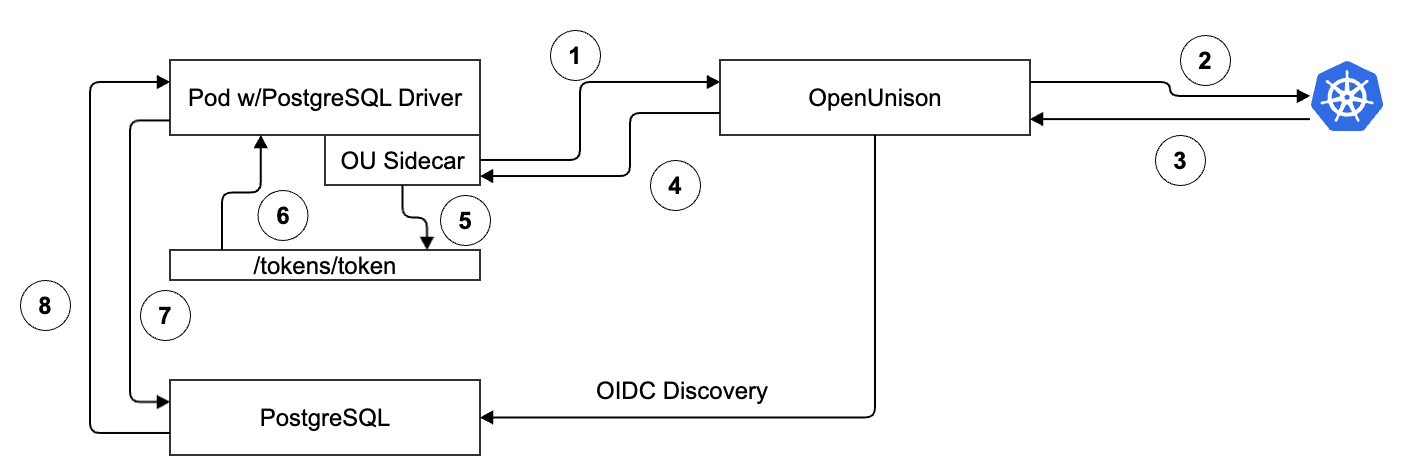
- The Pod presents its ServiceAccount token to OpenUnison.
- OpenUnison submits a TokenReview to the application's Kubernetes API server.
- Kubernetes validates the ServiceAccount's token by checking that it is bound to a running Pod
- After successful validation and authorization, OpenUnison issues a short lived JWT for database access.
- The sidecar writes the token to a shared volume
- The application's PostgreSQL client reads the token generated by OpenUnison and uses it for database connections
- The application presents that JWT when connecting to PostgreSQL.
- Percona's validator validates the token against OpenUnison's OIDC discovery configuration, and PostgreSQL maps the authenticated identity to the configured database role.
Our database now trusts OpenUnison's issuer. Kubernetes API access stays with OpenUnison, using the permissions it needs for TokenReview. We don't need to distribute a Kubernetes API credential to each database deployment.
We also have the information needed to distinguish workloads across clusters. For example, an application using the orders ServiceAccount in the sales Namespace of our production cluster can be mapped to its own database role. Another ServiceAccount with the same name in a development cluster shouldn't get the same access just because the names match. The cluster, Namespace, and ServiceAccount together give us the identity we need.
There's one detail to keep in mind: TokenReview validates the Pod binding when the exchange happens. An already issued JWT can still be accepted until it expires, and expiration doesn't automatically terminate an existing database connection. Keeping the JWT lifetime short limits that authentication window. The application also needs to load a current token when opening new connections, so token refresh and connection pooling need to work together.
Now let's go back to the service we wanted to build. A git commit creates our database and its access configuration. Our application launches with a Kubernetes identity. OpenUnison validates that identity and issues a short lived token, and PostgreSQL uses it to authenticate the application with the permissions we've assigned.
To make this work, you'll need at least one Kubernetes cluster (though two makes for a better demo and that's what we'll assume). The first cluster runs the PostgreSQL services and operator, the second runs your application:
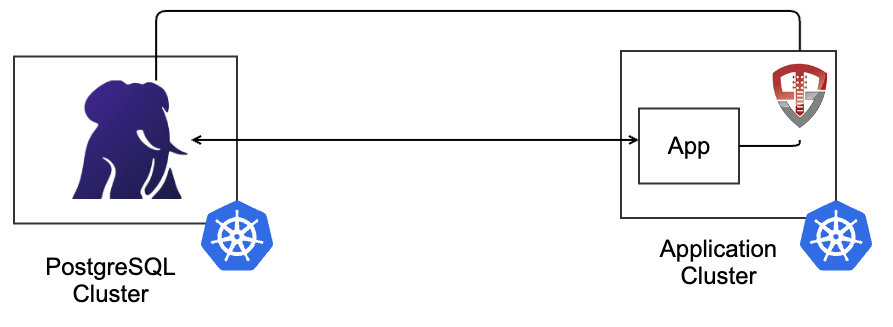
We're going to start with the application cluster. We built a git repository with all the code used for this demo. First, deploy OpenUnison with a headless configuration for the STS. To configure the STS, add the STS configuration to your OpenUnison values.yaml:
There's an example values file in application-cluster/openunison.
With the STS deployed, the next step is do deploy PostgreSQL. A production setup would first deploy the CloudNativePG project, and then provide a way to deploy individual clusters. Thats outside the scope of this post, so we're going to combine them to make it easier. In our git repo, postgresql-cluster/cpnpg contains the helm chart for deploying PostgreSQL. We're not going to walk through each step, there are a few key points about this chart:
- It assumes using Traefik's IngressRouteTCP for exposing our database on 5432, the we developed on is a single node Talos cluster.
- There's at least one storage class available for PostgreSQL to create storage with.
Before deploying PostgreSQL, create a container with Percona's JWT validation library. Unfortunately there isn't a pre-built container. the postgresql-cluster/cnpg-oauth/Dockerfile. This Dockerfile will generate a container based on CNPG's v18 image with the Percona validation library using a multistage build. Before running the build get the CA certificate for your Ingress controller on the application cluster where OpenUnison is running and copy it to the extra-ca folder in the chart. Make sure to name it with a ".crt" extension. This will allow the validation library to trust your issuer's CA for TLS. There's no way to turn of TLS validation.
With our image now available, we can configure and deploy our helm chart for PostgreSQL. The values file for the chart as a few important configuration points:
- cluster.imageName - The Image you just created for PostgreSQL with your issuer's CA certificate
- oauth.issuer - The URL for your issuer. It will be the host + the path for your endpoint in OpenUnison
- identity - This is the sub in your claim. The STS sub is in the form cluster:namespace:name. This will be mapped to the user named in cluster.owner
The last configuration option is the most important, since it's how PostgreSQL knows who your application is. When working with JWTs, the JWT's sub claim can be anything from a random series of characters to a specific name that doesn't work with with PostgreSQL, so configuring it with a mapping mechanism makes sense. Once the chart is deployed, your CNPG cluster will have an hba.conf that looks like:
Finally, the above configuration tells your database to map our sub, "openunison-cp:task-manager:default", to the database user appuser. Once we're up and running, we can assign permissions as needed to appuser. Now that our database is running, we can connect to it from an application.
Connecting to PostgreSQL From an Application
This is the biggest gap as of this post's publication. There's no mechanism to connect with an existing token with psql or other language SDKs. The PostgreSQL's JDBC driver is farthest along, with an open PR being actively developed, so we can use that in our example application. The pr builds an implementation that allows you to implement a simple interface that provides a token to the driver. The first thing to do is checkout the pr and install it:
With our jdbc library built and deployed, we can write an application. ChatGPT was kind enough to build a simple task application built on Spring Boot. The application-cluster/task-manager directory in our git repository has everything you need to deploy.
Our implementation to load the token is pretty straight forward in src/main/java/dev/tremolo/psql/ServiceAccountOauth2Provider.java:
Our implementation is just loading the token generated by the OpenUnison side car. The sidecar is doing all the heavy lifting to get a working token!
In the future, we may implement the token exchange directly into the driver so you could skip the sidecar alltogether.
Now that we know how we'll get a token, the next thing to do is build the app. Running "mvn package" will generate a tar file for your docker container. Push that container to a registry by first loading it locally then pushing. For instance:
With our container built, the next step is to configure our application to talk to PostgreSQL with our Pod's identity. The application-cluster/task-manager/k8s directory of the git repository has all of the manifests. The first part that's important is the ConfigMap:
Our URL tells the driver that we want to use OAuth2 and then we want to use our own custom provider. Next, if we inspect our Secret, there's only a username. No password. That's because even with a token, we still need to tell the driver who we want the user to be. The database will validate this mapping based on our configuration in the hba.conf section of our database configuration.
Finally, let's look at our Deployment:
The spec includes the label "tremolo.io/psql-sts", this tells the API server to send all Pods generated by this Deployment to OpenUnison's STS for injecting the OpenUnison sidecar. The "tremolo.io/" prefix makes sure that the labels don't conflict with other labels and annotations. The "psql-sts" maps back to our values.yaml where sts.endpoints[0].injector.label tells OpenUnison how to identify Pods that should get this identity. Next there are four annotations with the "tremolo.io/" prefix. The "psql-sts" annotation serves the same purpose as the label. "non-root" tells the side car to run as a non root account, while "user" and "group" tell OpenUnison what Linux identity to run the sidecar as.
Once the Pod launches, there are two containers. Our sidecar has been injected as an init-container with a restart policy of "Always" (Kubernetes 1.28 native sidecars). The sidecar is responsible for obtaining a token for PostgreSQL and keeping it up to date. It's a small scratch container with a single binary. While there are sane resource restrictions by default, you can also configure more specific resources for your environment. When we inspect the logs, we can see that our PostgreSQL driver is getting the token from OpenUnison:
And when we look at the sidecar, we can see the token getting updated:
A great benefit of using OpenUnison is that it will automatically detect when a key has changed. If you have cert-manager generating the issuer key pairs, the key will get updated automatically on a regular basis. You can also delete the key to force a new key to get generated. The sidecar will detect the change:
PostgreSQL will also see the change and start validating tokens against the new key. There's no service interruption, letting you rotate keys quickly and often.
There's no application database password to copy into a Secret, synchronize between systems, or coordinate a rotation window around. We still manage database permissions and trust configuration, but those can be part of the same automation that provisions the database. CloudNativePG manages the database lifecycle, and OpenUnison connects our workload's identity to database access.
Want to see it working? Register for a demo, and we'll walk through using OpenUnison, PostgreSQL 18, and Kubernetes workload identity to connect applications without database passwords!